Software & Comparisons
Best Tattoo Shop Software in 2026: An Honest Comparison
An honest comparison of the best tattoo shop software in 2026: Tattoo Studio Pro, Porter, Keep the Fees, Linework, DaySmart Body Art, and TattooGenda. Real pricing, consent forms, commission splits, and where each one fits.

Most “best tattoo shop software” roundups fall into one of two traps. Either they list Square, Acuity, and Vagaro (tools designed for hair salons and yoga studios), or they were written by one of the vendors and conveniently rank themselves first with no real numbers for anyone else. Neither is useful when you’re deciding what to put on your front desk.
This guide is published by Tattoo Studio Pro, so we say that up front. What we can do is name tattoo-specific options, quote each vendor’s own page as checked on November 8, 2026, and be specific about where each platform fits.
This page is the buyer’s guide: who each platform is for, what it costs at your headcount, and where each one falls short. For a feature-by-feature grid (forms, deposits, commissions, websites, trials), our tattoo business management platforms comparison is that matrix.
If you’re still working out which features you need before you compare vendors, start with our guide to what to look for in tattoo studio management software. If booking is the only problem you’re solving right now, the tattoo booking software page covers that workflow on its own. The Software Playbook covers implementation and training once you’ve picked.
Why Generic Salon Software Fails Tattoo Shops
Square Appointments, Vagaro, Acuity Scheduling, and Fresha are capable booking tools. They just weren’t built for the operational reality of a tattoo studio. Three places where this shows up:
Consent form retrieval under inspection. Health inspections don’t come with much notice. When an inspector asks to see the signed consent form for a client who came in six weeks ago, you need to pull it up by name and date in a few minutes. Generic booking tools often leave forms in email inboxes, shared drives, or somewhere separate from the client record, which turns a 20-second lookup into a 20-minute search.
Commission splits across multiple artists. A studio with four artists, each on a different commission rate (say 50%, 55%, 60%, and a guest artist at 70%), needs software that calculates commission, tracks tips separately, and produces a payout report per artist per pay period. Generic salon software tends to treat staff as wage employees, so commission tracking ends up in a second spreadsheet. Studios that grow past two or three artists run into this wall.
Multi-session client continuity. A full Japanese sleeve takes several sessions over many months. When a client comes in for session five, the artist needs to know what was finished before, how it healed, whether there were any skin reactions, and where they left off. Generic booking software records appointments as isolated events with no shared history across artists.
If your studio is low-volume, single-artist, and has no complex workflows, a generic tool works fine. If you run multiple artists, split commissions, health inspection paperwork, or multi-session clients, you need something built for tattooing.
The Tattoo Shop Software Worth Comparing
Every price below comes from the vendor’s own page, checked on November 8, 2026, at monthly billing unless noted. Software pricing changes often, so confirm on the vendor’s site before you buy.
Tattoo Studio Pro is our tattoo studio software, built for tattoo and piercing studios. Every plan includes every feature: scheduling, digital consent forms, client profiles, checkout, commission reporting, reminder texts, and portfolios. Plans differ only by how many team members can be active at once. Managers and health officials never count toward that limit. Solo is $29/month, or $239/year, for 1 team member. Yearly billing costs less than paying monthly. Other team sizes are on the pricing page. It runs on web, iOS, and Android. The trial is 30 days and includes every feature. It asks for a payment method. You are not charged until it ends, and you can cancel before then. Appointment messages in help are a booking-confirmation text plus up to 5 reminder texts.
Porter splits plans between independent artists and shops. On Porter’s pricing page, Artist Essentials is $35/month with a 30-day trial (calendar, deposits and payments, reminders, post-appointment follow-ups). Artist Pro is $65/month with a 30-day trial and adds automated waivers and consent forms, plus email and SMS marketing (100 free marketing SMS a month and 250 free marketing emails a month). That card also says “One Location.” Studio Pro is $250/month with a 14-day trial, unlimited artists and staff, automated commission splits, 1099s, waivers, marketing, general shop booking requests, and a custom shop website. Studio Ultimate is the multi-location plan, and it has no published price.
Keep The Fees uses dual pricing. Its FAQ, checked November 8, 2026, says every sale shows a cash price and a card price, and the card price covers processing. Individual is $69.99/month for solo artists and private studios. Mid-sized is $99.99/month for 3 to 6 artists. Large studio is $129.99/month for 7 or more artists under one roof. The same FAQ says the trial is 30 days and does not need a credit card. It describes booking, digital forms, a queue, two-way messaging, commission splits, inventory, reporting, and iOS and Android apps. One owner account can manage more than one studio. The site also has a payroll page. That FAQ does not say whether payroll sits inside the monthly price, so this page does not.
Linework, on its pricing page, uses the same features on every plan and changes the transaction fee. Artist Free and Studio Free are $0/month with a 6% fee per transaction. Artist Pro and Studio Pro are $19/month and list only Stripe’s fee, 2.9% + 30¢. You can pass the fee to the client or cover it. Both sides list digitally signed consent forms, an automatic commission split, guest artist support, and iOS, Android, and web. A studio account holds manager seats. One manager seat is included.
DaySmart Body Art prices by user count on its pricing page: Basic is $29/month for 1 user, Deluxe is $69/month for 3 users and is where digital forms start, Deluxe Growth is $149/month for 3 users, and Premium is $199/month for 6 users. Deluxe, Deluxe Growth, and Premium add users at $9 each. The trial is 14 days with no credit card. Sliding-scale commission is listed on Premium Growth, which has no published price. The website builder is an add-on on every plan.
TattooGenda prints two currencies on its pricing page, and they are not one converted price. The Expert plan card is €45/month or €495/year, and also $20/month or $220/year. Ultimate is €89/month or €979/year, and also $50/month or $550/year. SMS on those cards is €0.11 or $0.13. A feature table lower on the same page shows $50/month and $100/month. This page does not pick a dollar price. The euro cards also list a calendar for resident and guest artists, consent forms, Ink Passports, and, on Ultimate, one inbox for email, Instagram, WhatsApp, and Facebook. The users row says unlimited on both plans, counting artists, guests, reception, and admins, active and inactive. Every plan starts with a 14-day trial, and the page says no credit card is needed.
| Tattoo Studio Pro | Porter | Keep the Fees | Linework | DaySmart Body Art | TattooGenda | |
|---|---|---|---|---|---|---|
| Entry price (monthly) | $29 (Solo) | $35 (Artist Essentials) | $69.99 | $0 (6% per transaction) | $29 (Basic, 1 user) | €45 (Expert) |
| How price scales | Active team members | Artist vs studio plans | Headcount | Transaction fee only | User count | Plan tier, unlimited users |
| Digital consent forms | Every plan | Artist Pro and studio plans | Described on the site | Every plan | Deluxe and up | On the plan cards |
| Commission splits | Every plan | Studio Pro | Per artist, on the FAQ | Every plan | Premium Growth only (contact for pricing) | Not quoted on the cards we used |
| Free trial | 30 days, payment method, not charged until it ends | 30 days on artist plans; 14 days on Studio Pro | 30 days, no card | Free tier (no separate trial listed) | 14 days, no card | 14 days, no card |
Which Plan Fits Your Studio Size
Headline entry prices mislead, because the cheapest plan rarely matches your real headcount. Compare like for like, then open the vendor page for the plan that matches your team:
- Solo artist: Tattoo Studio Pro Solo is $29/month with every feature. Linework Free is $0 a month and takes 6% per transaction. DaySmart Basic is $29 and does not include digital forms.
- A few artists: DaySmart Deluxe is $69/month for 3 users, and each extra user on that plan is $9, so 5 users is $87/month. TattooGenda’s Expert plan card is €45/month, with unlimited users on the users row, plus €0.11 per SMS. Tattoo Studio Pro prices the next team sizes on the pricing page. Help says managers and health officials do not count toward the staff limit.
- A larger shop: Porter Studio Pro is $250/month, with unlimited artists and staff and a 14-day trial. Keep The Fees Large studio is $129.99/month for 7 or more artists under one roof.
- More than one location: Porter lists Studio Ultimate for multiple locations, with no published price. Keep The Fees says one owner account can manage several studios. Tattoo Studio Pro’s current plans are on the pricing page.
What Features Actually Matter
The feature marketing gets noisy. Here’s what creates friction in day-to-day studio operations:
Deposits at booking. Collect the deposit when the appointment is created, not as a separate payment request later. Separate payment links get ignored or forgotten.
Searchable, client-linked consent forms. Signed forms stored on the client record and retrievable by name and date. What an inspector checks is whether you can produce the right signed form quickly.
Artist-level commission reports. The report should show revenue, commission rate, commission amount, tips, and payout per artist per period. If you run this by hand in a spreadsheet, you spend hours each pay period on something software can do for you.
Session notes tied to client profiles. Notes from one session should be visible when the client comes back, even if a different artist handles it. This matters most for allergies, sensitivities, and multi-session projects.
Texts and what they cost. Check whether texts are included, capped, or billed per message. TattooGenda’s plan cards add €0.11 or $0.13 per SMS. DaySmart Basic lists 500 texts. Tattoo Studio Pro’s help describes a booking-confirmation text and up to 5 reminder texts. It does not state a per-text price.
The guide to client management software for tattoo studios goes deeper on client records, intake forms, and how client history ties into appointments.
The True Cost of Ownership
The monthly fee is only part of what you’ll pay:
Monthly software: Tattoo Studio Pro starts at $29/month for Solo. The price for a larger team is on the pricing page. A per-user tool costs more as the roster grows. DaySmart Deluxe at 5 users is $87/month, as above.
Payment processing: Every platform either connects to a processor or includes its own. Stripe’s US pricing page, checked November 8, 2026, lists 2.7% + 5¢ next to in-person card payments. Tattoo Studio Pro takes card payments through your own connected Stripe account. On $10,000 of in-person card sales, 2.7% is $270 before the 5¢ on each charge. Linework Free adds its own 6% fee. Linework Pro lists Stripe’s 2.9% + 30¢. Keep The Fees’ dual pricing puts the card price on the client. A tattoo-specific tattoo shop POS folds deposits, tips, and commission splits into one checkout.
Hardware: You probably own most of it already. Tattoo Studio Pro runs on a modern tablet, phone, or computer. Help lists Stripe Reader M2 at $59 and the Stripe Reader S700 and S710 at $299, Stripe’s published prices.
Text volume: If a platform bills per message, check that line before you compare monthly fees. At TattooGenda’s plan-card rate of €0.11 per SMS, 200 texts is €22 on top of the plan.
Switching costs: Budget time, not money. Tattoo Studio Pro’s free client data import moves your client list (and appointments or other client data if your old platform can export them), either by you or by our team. Stored files such as old signed form PDFs don’t transfer. Rebuilding your consent forms the way you want them and running both systems side by side take the most time. If you are opening a new shop, read the new-studio offer.
The break-even analysis for tattoo studio management software walks through how long the time savings take to cover the subscription for different studio sizes.
Tattoo Studio Pro in Detail
Here’s what our recommendation is based on, with each point taken from our own help docs.
Every plan includes every feature. Solo includes the same consent forms, commission reporting, reminder texts, and client profiles as the larger plans. Plans differ by how many team members can be active at once. Current prices are on the pricing page.
Consent forms are searchable and client-linked. Once a form is signed, a PDF is generated and saved to the client’s profile and to the Forms Archive. The archive searches by client name and filters by artist and date range, so pulling a specific form during an inspection is quick.
Commission tracking is built in. Help documents a flat percentage, a cash rate and a card rate, or a sliding scale. My earnings shows a team member their own commission. Other people’s earnings stay with owners and managers, and a shared PIN limits that. This is reporting. It does not pay people.
Client history in one place. Client profiles hold appointment history, signed forms, purchase history, and private staff notes, so the full picture is there when a client returns for a later session.
Appointment texts. Tattoo Studio Pro sends a confirmation text when an appointment is booked and up to five scheduled reminders before it, configurable in the Message Editor. Help does not describe those texts as unlimited, and it does not state a per-text price.
30-day trial. The trial includes every feature. It asks for a payment method. You are not charged until it ends, and you can cancel before then.
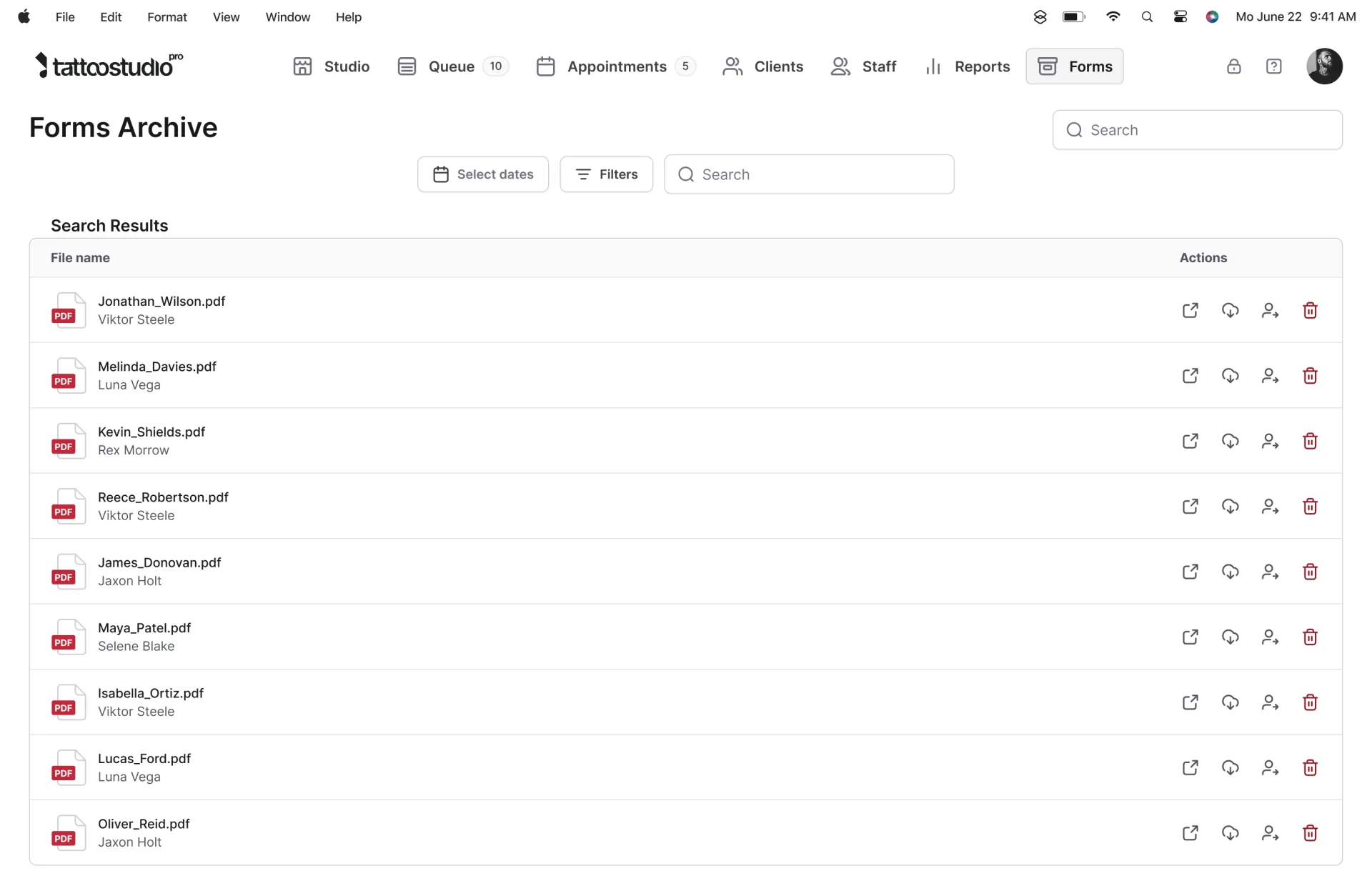
The overview below shows how these pieces fit together in one workflow, from booking through checkout and reporting.
Where Tattoo Studio Pro is not the best choice: if you want a $0 monthly bill and are fine paying a per-transaction fee, Linework Free is built around that. If you want card processing costs passed to the client through dual pricing, that’s Keep the Fees’ whole model. If you run an EU studio and want Ink Passports built in, TattooGenda was designed for that.
For booking-specific comparisons, scheduling tools for tattoo studios covers the major platforms in detail, and the free tattoo booking platforms guide breaks down what you get at $0/month.
Plans start from $29/mo. See everything our tattoo studio software includes and start the 30-day free trial. Cancel anytime.
FAQs
What is tattoo shop software?
Tattoo shop software is the system that runs your studio day to day: booking appointments, collecting deposits, storing client records, handling digital consent forms, checking out clients, and producing reports. It replaces the mix of DMs, paper forms, and spreadsheets most shops start with. The difference from general booking software is that it’s built around tattoo work, with consent forms on the client record, commission reports per artist, and history that carries across multi-session projects.
What features actually matter when picking tattoo shop software?
The core list is shorter than most product pages suggest. You need multi-artist scheduling, deposits at booking, digital consent forms you can retrieve quickly in an inspection, commission reports per artist, and client records that carry history across visits. Missing one of those usually means a second spreadsheet. Features past that list are convenience.
Can I just use Square, Vagaro, or Fresha instead?
Yes, if your studio only needs scheduling and a card reader. Those products are general appointment tools. If you also need consent forms on the client record, multi-session history, and artist commission splits, check whether the plan you are looking at includes them. Studios that use a general tool often keep a second system for forms or payouts. Square’s own pricing page, checked the same day, does list deposits and e-sign contracts on every plan, including Free. It does not describe a tattoo portfolio or a health-official role.
How much does tattoo shop software cost?
Checked November 8, 2026: Linework Free is $0/month with a 6% transaction fee. Porter Studio Pro is $250/month with unlimited artists and staff. Tattoo Studio Pro Solo is $29/month. Larger Tattoo Studio Pro prices are on the pricing page. DaySmart Body Art runs from $29 to $199/month on the published plans, plus $9 per extra user on Deluxe and up. Keep The Fees starts at $69.99/month. Stripe’s US page lists 2.7% + 5¢ for in-person card payments, on top of the software fee.
Is it worth it for a solo artist?
Depends on your volume. If you’re doing a handful of sessions a month and booking through Instagram DMs, a calendar app and paper consent forms can work. As volume grows, the admin time starts to outweigh a $29/month subscription. The less obvious win for solo artists is not losing client history when your phone dies or a DM thread disappears. A client who comes back two years later, with their skin reactions, consent form, and design notes on file, is worth more than any single saved hour.
Can it handle multiple artists with different commission rates?
Purpose-built tattoo platforms can. On Tattoo Studio Pro, help documents a flat percentage, separate cash and card rates, or a sliding scale. My earnings shows each person their own numbers. Porter Studio Pro lists automated commission splits. Keep The Fees and Linework also list per-artist splits. If you have guest artists or apprentices on different rates, this is the feature most likely to decide whether the software works for your shop.
Are digital consent forms legally valid for tattoo work?
Under the federal E-SIGN Act, a signature or record can’t be denied legal effect solely because it’s electronic. Your state or county health rules still decide what a tattoo consent form must contain and how long you keep it, so check those with your local health department. In practice, what matters during an inspection is whether you can produce a complete, signed copy for a specific client and date quickly, and a searchable digital record on the client profile is faster to produce than a filing cabinet.
How long does switching from another system take?
There is no published duration that fits every shop. Client import is the fast part when the old platform can export. The slower parts are rebuilding your consent forms, training staff, and running the new system alongside the old one until you trust it. Don’t switch during your busiest month. Use the new system for new bookings and let the old calendar finish out.