Tattoo booking software and app for studios.
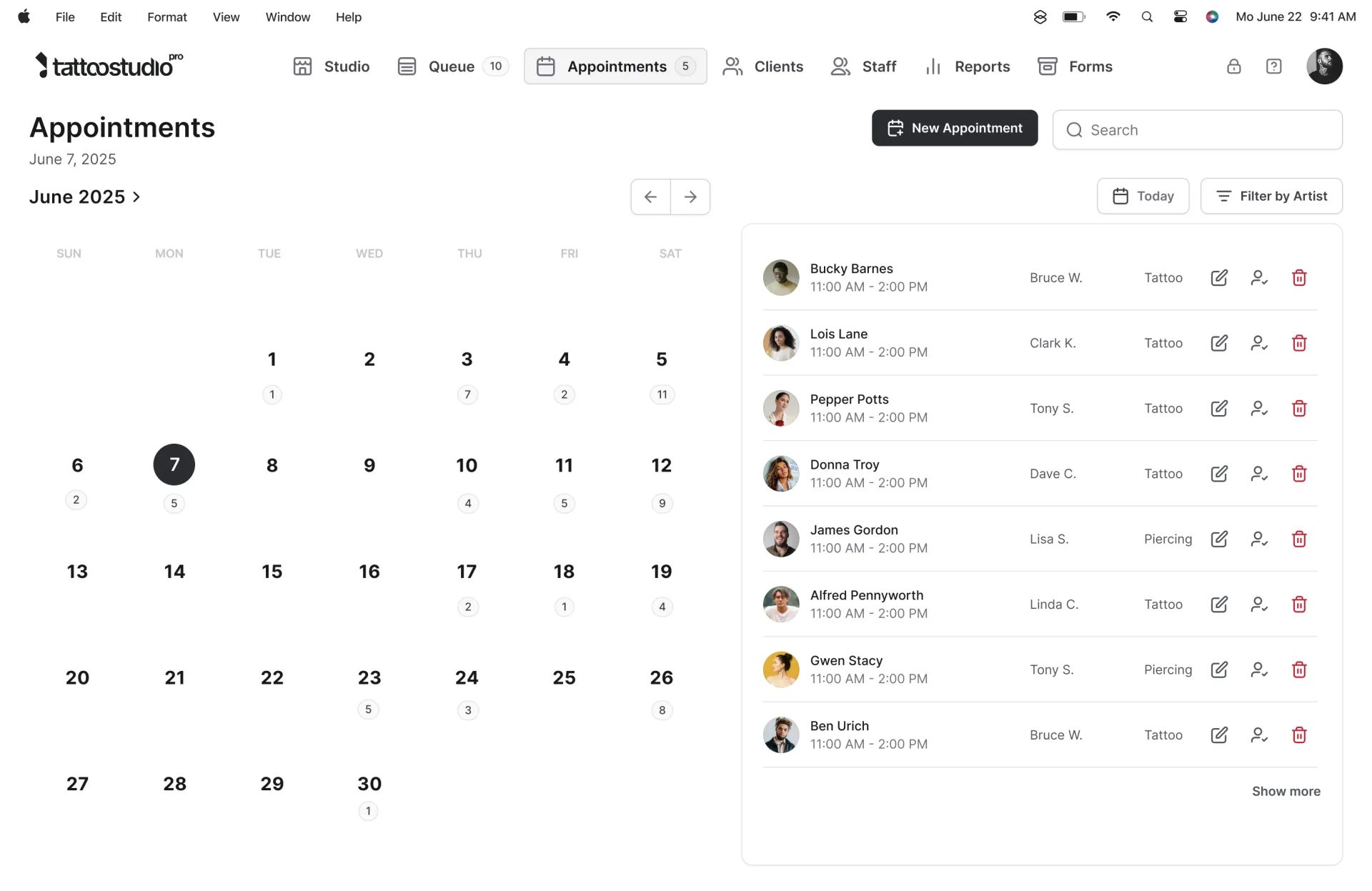
Online booking and scheduling in one tattoo scheduling app for iOS, Android and web. Deposits, client records, and appointment tools, with unlimited SMS reminders on every plan.
Why tattoo booking software matters.
The problem
DMs, texts, and voicemails. Clients ghosting after saying "I'll book tomorrow." Deposit collection that lives in a separate app. Reminders you forget to send. No-shows that leave an empty chair and a gap in the day you can't fill.
How Tattoo Studio Pro fixes it
Clients request online, you book it in a tap, and the confirmation text carries the deposit link. Your reminder sequence then runs itself, up to five messages timed how you like. Unlimited reminders on every plan, no per-text charge. Client records, consent forms, and payment history are all connected to the appointment, and checkout runs through the built-in tattoo shop POS. Commission can run on one rate, separate cash and card rates, product rates, pay periods or a sliding scale. See artist commissions. Booking is one part of our tattoo studio software, so the same appointment carries through check-in, forms, checkout and reports.
How tattoo booking software works, step by step.
Here is the whole booking flow in Tattoo Studio Pro, from the first request to the deposit coming off the bill at checkout. Set it up once and most of it runs itself.
- Step 1
Set your hours, services and artists
Set per-day opening hours and a studio timezone, give each artist their own working hours and time off, and tick the services each artist offers. The public form reads all of it, so clients only see days and times when the artist they picked is actually working.
- Step 2
Share your request form
Copy your form link from Settings > Sharing and put it in your Instagram bio, on your Google Business Profile, in your email signature, or embed the form on your own website with one snippet. Clients can send a request 24/7 without creating an account.
- Step 3
The client sends a request
They pick a service and an artist (each list narrows to match the other), choose a date and a morning, afternoon or evening slot, add notes and a reference image, and answer any optional intake fields you switched on, like size, placement, style or budget. Those tattoo questions only show for tattoo services, so a piercing request isn't asked about placement and style.
- Step 4
Talk it through if you need to
Not sure about the size or placement? Open the request and tap Message. Your reply goes to the client by email with a link to a private chat page. They answer by email or on the page, and can send photos. They never need an account or the app, and they see your studio's name, not your team's. Messaging covers booking requests, so requests sent before it launched don't have a conversation.
- Step 5
You book it from the inbox
The request waits in your inbox as Pending. Tap Book and the appointment editor opens pre-filled with the client, so you only adjust the date, time and artist. Their notes and reference photos attach to the appointment. Not a fit? Decline it and the record stays for reference.
- Step 6
Confirmation, deposit and reminders go out
The booking confirmation text goes out the moment you save, with the deposit link and the client’s check-in link. Your reminder sequence then runs itself, up to five texts per appointment, each with its own timing and message.
- Step 7
Check-in, consent and checkout on the day
The client completes intake and signs the consent form on their phone before they arrive, or on a tablet at the desk. You mark them arrived, do the tattoo, and the deposit they already paid is applied automatically at checkout.
| Your setting | What happens | Good for |
|---|---|---|
| Require deposit to confirm: on | New appointments stay Awaiting Deposit (amber) until the client pays, then confirm themselves (green). | Weekend slots, big custom pieces, brand new clients. |
| Require deposit to confirm: off | Appointments confirm on creation. The deposit link still goes out, but paying is optional. | Returning regulars and low-risk midweek bookings. |
Client says the text never arrived? Open the appointment and copy the deposit link to send it any way you like. More on online deposits.
Reminders that would land in the past are skipped, cancelling an appointment deletes its pending texts, and you can switch texts off for a single booking with the Send SMS checkbox. Put the check-in link in a reminder and clients can finish their intake before they walk in.
What to look for in tattoo booking software.
Most booking apps and appointment software are built for salons or spas and bolted onto tattoo workflows as an afterthought. Whether you are shopping for a tattoo booking app, tattoo booking software, or a scheduling setup for a multi-artist shop, here is what actually matters.
- Consent forms attached to the client record. Not a separate upload. Not a paper form scanned in later. The consent form should live next to the appointment and the client profile automatically.
- Deposit capture at the moment of booking. Not a manual invoice sent afterward. The deposit link goes in the booking confirmation so clients pay before they can forget.
- Multi-artist scheduling with individual calendars. Each artist needs their own availability, their own client queue, and their own commission tracking. A shared calendar does not cut it for studios with two or more artists.
- Day-of queue management. Walk-ins, rescheduled appointments, and running late. The booking app needs to handle the chaos of a real studio day, not just a clean calendar.
- A POS that understands commissions. Generic POS tools process payments. A tattoo-specific POS tracks the studio and artist split on every sale, records tips, and handles session-based charges.
If a tool checks all five, it was built for tattoo studios. If it checks two or three, you will be working around its gaps every day.
Comparing free booking platforms first? Honest free/catch list when budget is the first filter.
Want a paid scheduling comparison? Side-by-side scheduling tools for tattoo studios.
See how we compare, side by side → Full breakdowns against the other platforms studios run on.
Powerful booking doesn't need to be complicated.
Deposits, and a list of who still owes one
Set one flat amount and the booking confirmation carries the deposit link. They pay on a hosted Stripe page, no login, and the appointment can confirm itself when it clears. Filter your list to awaiting-deposit-only across the next 30 days and you have your chase list, phone numbers ready to tap.
Unlimited SMS reminders
Automated text reminders at the times you choose. Unlimited SMS reminders on every plan, up to five per appointment.
Hours and availability that hold
Set per-day opening hours and a studio timezone, then give any artist their own working hours on top. The calendar shades your studio's off-hours, the public form stops offering times an artist is not working, and booking outside them asks you to confirm rather than refusing.
Client records that build themselves
Every appointment, consent form, note, preference, and payment tied to the client. Full history builds itself over time, visit by visit.
Walk-ins through the queue
Walk-ins and same-day clients flow through the queue system. Track check-ins, manage the floor, and keep the shop moving on busy days.
Tattoo-specific reporting
Collect deposits and payments via Stripe. Tattoo Studio Pro reports revenue, deposits, artist commissions, tips, tax and payouts, filterable by staff and exportable to CSV.
Tattoo booking software, by the numbers.
What studio owners say.
The booking system was not good for a tattoo shop. Maybe good for a hair salon...
Tattoo Studio Pro has been the most efficient app for us. Everything's right there for you.
What studios are leaving behind.
| Switching from | Why they switch |
|---|---|
| DMs + spreadsheets | Tired of losing bookings in Instagram messages and tracking deposits manually |
| A generic booking app | Need consent forms, client history, and tattoo-specific workflows |
| A commission-based marketplace | Done paying a cut of every booking to the platform that sent it |
| Salon and spa software | Want a tool built for tattoo, not adapted from hair and beauty |
| A directory-first booking platform | Need deposit collection, SMS reminders, and compliance features that actually work |
All features. Every plan.
Plans differ only by how many team members can be active at the same time, and annual billing saves about 30%. Manager and Health Official accounts are always included free. Your subscription also includes a website and hosting. Opening a new studio? If you opened in the last 3 months, or are about to open, you can apply for 6 months free. Switching from another platform? Free client data migration is included (client data, not stored files). Do it yourself or we'll do it for you. Start with a 30-day trial and cancel anytime. From $29/mo. See current plans and pricing →
Frequently asked questions.
Is Tattoo Studio Pro a tattoo scheduling app?
Yes. It is tattoo booking software and a tattoo scheduling app in one, on the App Store (iOS) and Google Play (Android). Every artist gets a column on one shared studio calendar, clients send booking requests through your online form, and deposits, unlimited SMS reminders and consent forms are included on every plan. Want to compare other scheduling apps side by side? See our scheduling tools comparison.
What is tattoo booking software?
Tattoo booking software takes appointment requests, collects deposits, sends reminders and keeps consent forms with the client record, built around how tattoo studios work. Tattoo Studio Pro does all of that inside one app, alongside checkout, reports and client profiles.
How does online booking work?
You get a shareable request form, as a link or an embed on your own site. Clients pick a service, an artist and a preferred time, and answer any intake questions you set up. The date picker already knows your opening hours and that artist’s availability, so nobody asks for a day you are closed. The request lands in your inbox, and it becomes a real appointment when you book it. Nothing writes itself onto your calendar.
Are SMS reminders really unlimited?
Yes. Every plan includes unlimited automated SMS appointment reminders. No per-text fees, no message caps. Build a sequence of up to five, with one-tap presets for a day, a week and a month ahead, or set your own spacing.
Can I collect deposits?
Yes. You set one flat deposit amount that applies to every new appointment. The booking confirmation carries a deposit link, the client taps it and pays on a hosted Stripe page with no login, and the appointment can confirm itself when the money clears. Until then it shows an amber Awaiting Deposit badge.
What about consent forms?
Tattoo Studio Pro includes digital consent forms with e-signature on every plan. You can send them before the appointment or have clients sign on a tablet when they arrive. Forms are stored with the client profile for compliance.
How does Tattoo Studio Pro compare to free booking tools?
Free and freemium booking tools tend to stop short of what a tattoo studio needs: no consent forms, no deposit workflow, limited SMS. And free usually is not free. Marketplace platforms typically make their money by taking a commission on bookings they send you, or by adding a booking fee your client pays at checkout. Tattoo Studio Pro includes every feature on every plan, with unlimited SMS reminders on every plan. For the free/catch list, see our free tattoo booking platforms guide. For paid scheduling options, see the scheduling tools comparison. Named, dated head-to-heads live on our comparisons page.
Can I try it before I pay?
Yes. The 30-day trial includes every feature. A card is needed to start, and the trial is risk-free: if it doesn't work for your studio, cancel anytime.
Does it work for multi-artist studios?
Yes. One shared calendar with a column per artist and filters to narrow it, plus their own login, permissions and PIN. Plans differ only by how many team members can be active at once, and Managers and Health Officials never count toward the limit.
Can I control which artist gets which booking?
Yes, and it works from both directions. Tick the services each artist offers, and the public form matches them up: pick a service and the artist list narrows to whoever does it, pick an artist and the service list narrows to what they do. You can pre-select a default artist, hide the "Any artist" option, or require clients to choose a real person. Anyone you do not want taking public bookings, like an apprentice or someone on a closed book, can be hidden from the form without deactivating their account.
Can clients book from my Instagram bio or my website?
Yes. Your request form has one link you can put in your Instagram bio, on your Google Business Profile or in your email signature, and an embed code that places the form directly on your own website without your studio header, so it fits the page. Clients can send a request any time, on any device, without creating an account.
Can I message clients about their request?
Yes, for requests that come in through your booking request form. Clients get an email confirming their request and can reply to it. You read and reply in Inbox > Messages, on web and mobile, with one thread per conversation. Your replies go to the client by email with a link to a private chat page. They answer by email or on that page, with photos if they want, and they never need an account or the app. The owner picks which team members can read and reply, and you can assign a conversation to someone. Messaging is not texting. SMS is used for reminders and confirmations only.
Do bookings go straight onto my calendar?
No, and that is on purpose. Online requests land in your inbox as Pending. You review the notes and reference photos, then book it (the appointment editor opens pre-filled) or decline it. Only booked requests become appointments, so your calendar stays yours.
What happens if a client books only a couple of days out?
Reminders that would land in the past are skipped automatically. If you run a one-week and a one-day reminder and a client books two days out, they get the booking confirmation and the one-day reminder, and the one-week text is never created.
What happens to reminders when an appointment is cancelled?
Cancelling an appointment automatically deletes its scheduled reminder texts, so the client never gets a reminder for a session that is not happening. The appointment stays in their history with a Canceled status, which you can restore if they turn up after all.
How do I see who still owes a deposit?
Open Appointments, switch to List view, set the range to the next 30 days and turn on Awaiting deposit only. You get every upcoming appointment with an unpaid deposit in date order, with tap-to-call phone numbers. On web you can copy any row’s deposit link from the same list to send it again.
Can I see my bookings in Apple Calendar or Google Calendar?
Yes, on mobile. Turn on device calendar sync and Tattoo Studio Pro keeps a dedicated calendar on your phone up to date with your bookings. It is a one-way, read-only mirror, so make changes in the app rather than in the phone calendar.
I am switching from another booking app. Can you move my clients?
Yes. Free client data migration is included: upload a CSV or Excel file yourself, or send us the file and we import it for you. It covers client data, not stored files, so plan to keep copies of any signed forms from your old system. New studio? If you opened in the last three months, or are about to open, you can apply for six months free.