Operations & Compliance
Tattoo Client Management Software: Client Records, Forms, and History in One Place
What tattoo client management software has to do: client profiles, session history, signed consent forms, notes, and payment records, plus what to check before you pick one.

Tattoo Client Management Software: What It Should Actually Do
You’re three clients deep into the day when someone walks in asking about their half-finished sleeve. You remember the session. You don’t remember which reference photos they approved, how much deposit they have sitting on account, or whether their allergy note was on the paper form or in a text. You figure it out, but it takes five minutes and feels messy.
That’s the client management problem in tattoo studios. Not dramatic. Just a slow leak: a little friction at every touchpoint that adds up to wasted time, missed details, and clients who sense the experience could be tighter.
Good client management software closes that leak. This post covers what tattoo client management software should handle, how the main types of tools compare, and what a proper client records system looks like in daily use. It is about the client side: profiles, history, forms, and records. If you are mainly shopping for scheduling, our guide to choosing a tattoo booking app covers that. If you want the wider view of tattoo studio software, start on our home page. For more technical depth, the client management chapter of our software playbook is there too.
Why Client Management Is Different in Tattooing
Most client management software is built for businesses where each transaction wraps up in one visit. You book, show up, pay, leave. Tattooing doesn’t work that way.
A typical client relationship in a busy studio might span years, multiple artists, dozens of sessions, and significant money. That relationship has layers that don’t exist at a hair salon or massage studio.
Health documentation is ongoing. Medical history, skin conditions, pregnancy status, allergy information: these affect what you can safely do. You need that on file before every session, not just the first one. When a health inspector walks through the door, you need to produce documentation fast.
Multi-session continuity matters. If you’re working on a full sleeve across eight sessions, the artist starting session four needs to know what happened in sessions one through three: what colors were used, what areas are healing, what the client approved for the next phase.
Consent forms are a legal requirement. Most jurisdictions require written client consent before any tattoo or piercing. Those signed forms need secure storage and must be produced on demand. Disorganized documentation creates real liability, especially in multi-artist studios.
Deposits tie to everything. Studios routinely collect deposits weeks or months ahead. Those need tracking per appointment, per artist, reconciled against final payments. Generic booking tools treat this as an afterthought.
The right software handles all of this without stitching together three separate apps to cover it.
How the Main Options Compare
The market for tattoo studio client management falls into three tiers. Understanding which tier a tool sits in saves time before you sign up for a trial.
Tier 1: Purpose-built tattoo studio management
These tools were built for how tattoo studios operate. Look for native consent forms, tattoo-specific client profiles with session history and reference photos, and deposits tied to appointments. The good ones understand that a “booking” in a tattoo studio carries fundamentally different data than a restaurant reservation.
Tier 2: Salon and beauty booking platforms
Salon and spa booking platforms handle appointment scheduling well and have some client management features, but they were designed for salons. Check how they handle tattoo consent forms and health history, and whether deposits connect to per-artist reporting, before you assume they fit. They tend to work better for studios doing mostly single-session flash work than for shops running complex multi-session sleeve projects.
Tier 3: Generic scheduling tools
General-purpose scheduling tools keep appointment history, but they are not built around tattoo session notes, reference photos on a client profile, or tattoo consent forms with health history. Fine for a solo artist managing everything else manually. Not fine for a studio trying to operate professionally at scale.
Here are the questions to ask of any tool, whichever tier it sits in:
| Question | Why it matters |
|---|---|
| Are consent forms built in, with health history? | Signed forms should live on the client profile, not in a filing cabinet |
| Can notes and reference photos sit on the profile? | Multi-session work needs continuity between artists and visits |
| Do deposits follow the appointment? | Deposits should come off the balance at checkout automatically |
| Are SMS reminders included or billed per text? | Per-message costs add up in a busy studio |
| Do reports show revenue, tips, and commissions by artist? | That is how a tattoo studio actually makes money |
The rest of this post focuses on what to look for within any tier and how to evaluate a specific platform before you commit.
What to Look for Before You Decide
Tattoo-Specific Workflows
Generic scheduling platforms built for gyms or hair salons treat consent forms and deposit tracking as add-ons. In purpose-built tattoo software, these are core features the whole system is organized around.
Key questions: Can you store reference photos directly on a client profile? Can consent forms be sent and signed before a client arrives, not scrambled at check-in? Are deposits tied to specific artists and appointments, or floating in a separate bucket? The answers tell you whether the software was designed for your actual workflow or someone else’s.
Client Profile Depth
A name, phone number, and booking history is not a client profile. A real client profile for a tattoo studio stores: appointment history by session, design notes and reference images per project, consultation records, all signed consent forms, payment and deposit history. That information should be accessible to every artist before a session starts, from whatever device they’re working from.
When a repeat client books six months after their last session, whoever handles intake should pull up their complete history in under a minute. That’s the standard to hold any software to.
Digital Consent Forms with E-Signature
Paper consent forms get lost, take time at check-in, and are slow to produce during an inspection. Digital consent forms with e-signature fix that. The signed form is saved to the client profile and kept as a record you can pull up on demand.
The Association of Professional Piercers has published documentation standards that apply across body art businesses. The bar is higher than many studios realize. Digital forms make compliance easier to maintain.
Payment and Deposit Tracking
Deposits, tips, artist commissions, refunds, partial payments for multi-session projects: these need tracking at the client level and reporting at the studio level. If your client management software doesn’t connect to your payment system, you’re manually reconciling two places every day. That doesn’t scale.
Look for financial reports that reflect how tattoo studios actually make money: revenue by artist, deposits collected versus applied, tips separated from service fees, commission calculations per session.
SMS Reminders
No-shows are expensive. The pricing model matters: some platforms charge per text, others include unlimited SMS in the subscription. If you’re running a busy studio with dozens of bookings per week, per-message costs pile up fast. Know what you’re actually paying before you commit.
Ease of Use for Your Whole Team
Software your front desk won’t figure out and your artists won’t use is worthless, no matter how many features it has. Check whether there’s a mobile app that works properly; artists don’t manage client notes from a desktop. The most common reason studios abandon paid software is that the learning curve killed adoption before it got started.
How to Evaluate a Tool Before You Commit
Reading feature lists tells you what a platform claims to do. Knowing how it actually performs in your studio requires a different approach. Before you sign up for anything paid, run through this:
-
Sign up for the trial and use it with real data. Import a few actual clients. Schedule a real appointment. See what frictions surface immediately, before any stake is in the ground.
-
Test the flow a repeat client experiences end to end. Booking to consultation to deposit to session to aftercare. Each handoff is where purpose-built software earns its price over a generic tool.
-
Look at financial reports using real numbers from your studio. Pull up revenue by artist, deposit tracking, tip summaries. If the report structure doesn’t match how you actually think about your finances, it won’t get used.
-
Use it on the devices your team actually uses. If your artists work from their phones and the mobile app is an afterthought, you’ve found your answer already.
-
Check what onboarding looks like and whether it fits your timeline. A tool that takes six weeks to fully configure isn’t better than your current setup if your busiest season starts in four.
What Good Client Management Actually Looks Like in Practice
Here’s what the two scenarios look like day-to-day.
Without a proper system: A client books online. Their contact info goes into your booking tool. Consultation notes are in a text thread. The deposit is in Square. Reference photos are in an email. The consent form is paper, filed somewhere. For session three, someone has to reassemble all of this from scattered sources before the artist can start.
With a proper system: The same client books online. Their profile already has their complete history: prior sessions, consent forms, reference images they approved, deposit balance, consultation notes. The artist opens the profile before they sit down, reviews the plan, and starts without asking the client to repeat themselves.
The second scenario isn’t just more efficient. Clients who feel like the studio knows them and tracks their projects come back. That’s what good client management actually delivers.
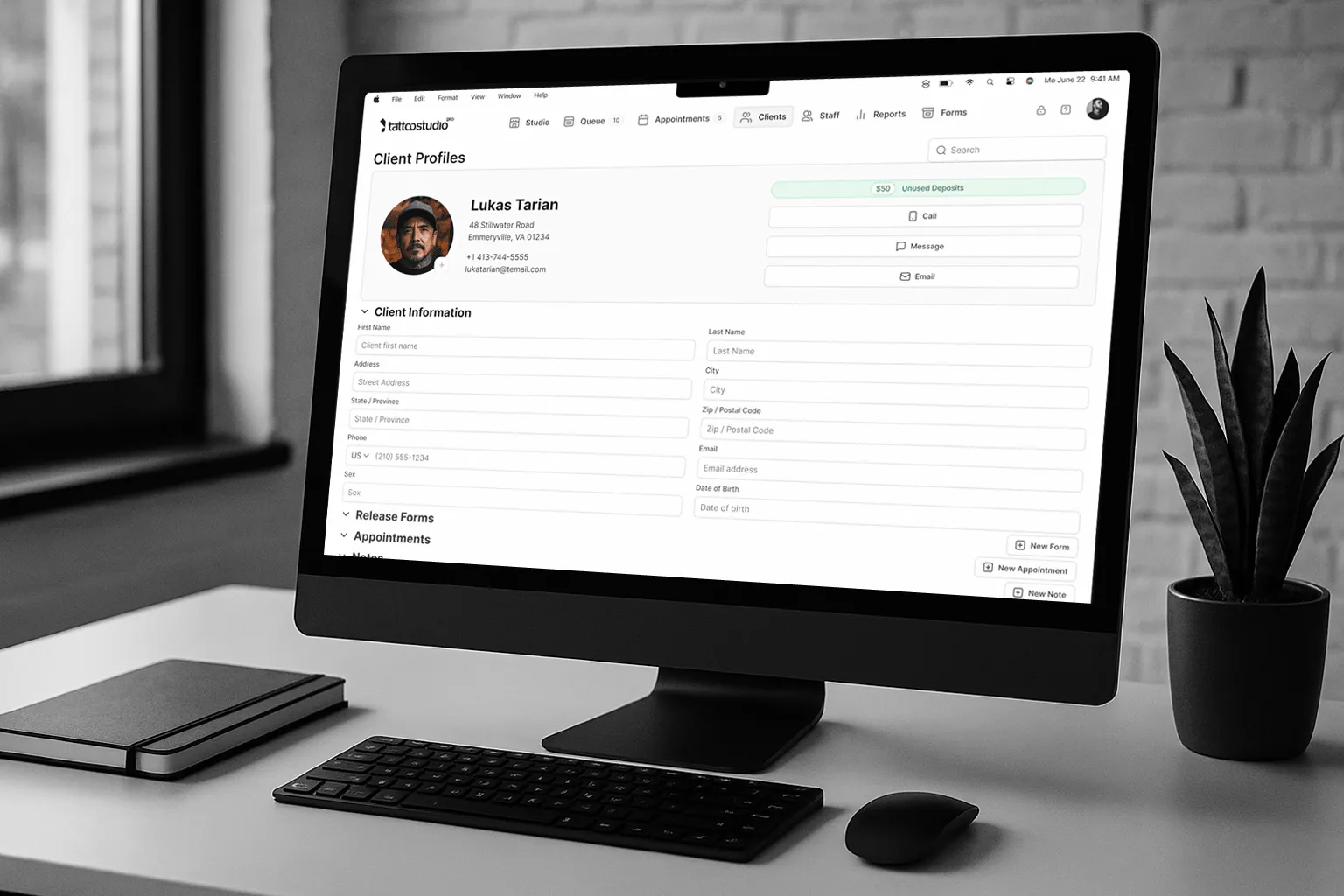
What Tattoo Studio Pro’s Client Management Covers
Tattoo Studio Pro was built specifically for tattoo and piercing studios. The client management side reflects that: not a general CRM with tattoo fields bolted on, but a system where every piece connects the way a studio actually operates.
Every plan includes every feature. Here’s what the client management side covers:
Client profiles store contact info, appointment history, private staff notes, reference photos and design images, signed consent forms, and purchase history. Complete history is immediately accessible when a client books. For studios running multi-session projects, artists always start from the full picture, not a blank slate.
Digital consent forms are built into the platform, not a third-party add-on. Clients fill in the intake form and health questionnaire, sign digitally, and a PDF is saved to the client profile and the Forms Archive. In the app, you can search the Forms Archive by client first name, last name, or file name, and filter by date range and artist. Nothing in the archive can be edited or deleted. For studios that want to go deeper on what you’re legally required to maintain, the client records chapter covers the compliance side in detail.
Financial reporting covers revenue, deposits, commissions, tips by artist, and payouts, filtered by date range, team member, payment method, and service type, with CSV export.
Unlimited SMS reminders are included on every plan at no extra charge. No per-message billing. Set up automated reminders and let the system handle no-show prevention.
Point of sale handles checkout within the platform: services, products, tips, and deposits. Card payments run through Stripe, and every completed checkout shows up in the client’s purchase history.
iOS, Android, and web apps share the same data, so client profiles, appointments, and forms are available on whatever device your team uses.
Pricing scales by active staff, not features. Every plan includes the full feature set. Solo covers one artist at $29/month, Crew covers up to five at $69/month, and Tribe covers up to ten at $119/month, with larger plans above that. Annual billing saves about 30%. Check current plans for the full list. Every plan starts with a risk-free 30-day trial you can cancel anytime.
Data Security: What You’re Responsible For
When you run client management software in a tattoo studio, you’re storing sensitive personal data: health information, financial records, contact details, signed legal documents. That comes with real responsibility.
Before committing to any platform, ask: where is client data stored? What’s the backup policy? How does the provider handle a security incident? What happens to your data if you cancel?
The FTC’s Safeguards Rule applies to small businesses that handle personal financial information, which includes tattoo studios collecting deposits and processing payments. Read the provider’s privacy policy and terms before you hand over client data. It’s worth pressing on it.
Connecting Client Management to the Rest of Your Studio
Client management doesn’t exist in isolation. It connects directly to how you acquire clients, retain them, and understand your studio’s finances.
On acquisition: the way a client experiences their first booking sets the tone for the whole relationship. A clean booking process and a consent form that arrives in their inbox before they walk in is a professional first impression. Disorganized intake is also a signal. Client acquisition and retention start with a system that supports both.
On finances: the data in your client profiles connects directly to revenue reporting. Which clients are highest-value? Which services drive repeat bookings? Which artists have the best retention rates? These questions are answerable when client data and financial data live in the same system. The financial management playbook covers how to use that data to make better business decisions.
If you’re evaluating booking and client management tools at the same time, our roundup of the best free tattoo booking platforms covers how pricing models and feature trade-offs break down across the main options.
FAQs
What’s the difference between client management software and booking software for tattoo studios?
Booking software handles appointments: online scheduling, calendar management, reminders. Client management software handles the broader relationship: profiles, history, consent forms, notes, financial records. The best tattoo studio platforms combine both in one system so the data is connected. When you book an appointment, the client’s full history is already attached. When you check out, the payment ties back to their profile automatically. Separate tools for booking and client management means manually connecting data that should connect automatically.
Do I need specialized tattoo client management software, or will a general tool work?
A solo artist doing straightforward single-session work can usually get by with a general booking tool. Once you add multi-session projects, multiple artists, or regular health inspections, the limits of generic platforms become concrete problems: consent form workflows that don’t fit tattooing, deposit tracking that doesn’t connect to artist records, financial reports that don’t reflect how the studio makes money. Purpose-built tools handle these natively, without workarounds.
How do digital consent forms work with client management software?
In a platform like Tattoo Studio Pro, consent forms are built into the system. You set up the form in the Form Editor, the client completes it at the studio or through your online check-in link, and signs digitally. A PDF is saved to their client profile and the Forms Archive, where you can open, download, or print it from any device. If you use the free consent form app instead, signed forms are saved as PDFs that you store yourself, so you find them with your device’s own file search rather than an in-app archive.
What should I look for in client management software for a multi-artist studio?
At the multi-artist level, priorities shift: per-artist financial reporting to track individual performance, consent forms and client records accessible to any artist who might work with a client, and a permissions system that controls what different team members can see. You also need the system to scale without a sudden price jump. Look for pricing based on staff count so you can add artists without losing features or jumping to a completely different pricing tier.
How much does client management software for a tattoo studio actually cost?
It depends on how a tool prices. Tattoo Studio Pro pricing scales by active staff, starting at $29/month for a solo artist, and annual billing saves about 30%. Check current plans for larger teams. With any tool, check whether SMS, forms, or integrations cost extra, because add-ons can push the real monthly cost above the headline price. For a comparison of tattoo business management platforms by feature set and actual annual cost, that breakdown is worth reading before you sign up for anything.
Is it safe to store sensitive client health information in studio management software?
Any reputable platform uses encrypted storage and secure data handling. The questions to ask before committing: where is the data stored, what are the backup practices, and what’s the process if there’s a breach? Read the provider’s privacy policy before you hand over client data. The FTC’s Safeguards Rule creates specific obligations for businesses that handle personal financial information, including studios that collect deposits and process payments. Understand those requirements regardless of which platform you choose.
What happens to my client data if I switch software?
Ask this before you sign up, not after. Reputable platforms export your client data on request, typically as a CSV file. Some also offer migration assistance to import records from your previous system. Confirm the export policy before committing so you’re not locked in.
Client management software isn’t a flashy purchase. It’s the foundation that keeps everything else from falling apart: records that protect you legally, continuity that makes multi-session work run smoothly, and data that tells you how your studio is actually performing.
For a platform built specifically around how tattoo and piercing studios operate, start a risk-free 30-day trial of Tattoo Studio Pro. Cancel anytime.